
How to organize an AI film project without losing prompts, takes and decisions
The problem is not storing files. It is preserving the memory of decisions. After months working on AI projects with Runway, Kling and Veo, here is the structure that works — and why folders, Notion and chat history are not enough.

April 2026
There is a precise moment when an AI project stops being exciting and becomes a problem. Not when generation fails. The moment is when you return to a project after ten days and no longer understand anything.
What was the approved prompt for shot 2.3? Which reference had defined the interior light? Why had you discarded that specific image or video? The answers existed. They existed in the session from two weeks ago, in the Gemini chat, in the folder with forty files named output_v2_FINAL_usethis.png. Now they are gone.
The problem is not that files disappear. The files are all there. The problem is that context is lost — and without context, the project becomes unreadable.
To organize an AI film project without losing continuity, you need four things:
- a stable hierarchical structure: Scene → Shot → Take
- a permanent link between prompt, reference and output
- decision notes that explain why a take was chosen or discarded
- a system that preserves these relationships over time, not just the files
In practice, it is also the problem of how to save prompts, organize outputs and make sure that the context of a session stays attached to the image or video that came out of it.
The rest of this article explains why, and how.
Chaos is the default, not the exception
When you work with AI tools on a narrative project — a short film, a commercial, a series — you generate far more than you use. For every shot that ends up in the film, there are often eight, ten, fifteen discarded takes. Each produced with a different prompt, a different reference, a different seed. Each evaluated and abandoned for a reason that was obvious at the time.
Runway does not know that shot 2.3 belongs to Scene 2. Kling does not know you used a reference built around a Storaro or Richardson light. Midjourney does not know why that character has grey hair and not white. These tools generate. They do not remember.
The result is what I call the readability-over-time problem. The files are there. The creative structure of the project — the whys, the decisions, the established visual directions — is not.
Why the obvious solutions are not enough
Numbered folders work while the project is small. The file shot_2.3_take_4_selected.mp4 is there — but you do not know which prompt generated it, which reference guided it, why it was preferred over take 3. The file survives. The memory of the decision does not.
Notion can hold scenes, shots, prompts, references. But it does not really preserve the relationships between them. It does not understand the difference between a take and a shot. It organizes notes. It does not preserve cinematic memory.
Chat history as a prompt archive is the most common workaround — and it is linear, not searchable by film structure, and vulnerable: the day that session is lost, you lose everything. More importantly, it has no concept of scene, shot or take.
The common pattern: these tools store files and information. They do not preserve the relationships between scene, shot, take, prompt, reference, output and creative decision.
Many workarounds come from exactly this place: renaming folders, saving prompts in separate files, keeping metadata and outputs close together. The problem is that these systems store material, but rarely preserve the actual creative context of the project.
The minimum system for organizing an AI film
After months working on AI projects with Runway, Kling, Veo and Midjourney, I have consolidated a system that works. It does not require specific tools to start — it requires structural discipline.
- Hierarchical structure before generating. Define the scenes and shots of the project before opening any tool. Scene 01, Scene 02 — with a short description for each. Every shot has a number (1.1, 1.2, 2.1) and a clear visual intention.
- Separate input and output. The prompt and the reference are inputs. The generated file is output. They must stay connected — not in separate folders, not in different browser tabs, not in different apps with no link between them.
- Every take must carry its context with it. Prompt, reference, output and a brief note: why this take was generated, what differentiates it from the previous one, why it was approved or discarded. One line is enough. The absence of that line costs hours when you return to the project.
- Do not use chat history as the central archive. Chat is a generation tool. The film archive is something else. If they are the same thing, the day the chat resets you lose the project's memory.
- Use a system that preserves relationships, not just files. The difference between an archive and a memory system: an archive knows where the file is. A memory system knows why that file exists, which shot it belongs to, which prompt produced it, and what was decided about it.
The structure that holds everything together: Scene → Shot → Take
A film is made of scenes. Scenes are made of shots. Each shot is produced through multiple attempts — takes. Inside each take there are four elements that must stay connected: the prompt that generated it, the reference that guided it, the output produced, the editorial decision that explains why it was chosen or discarded.
When these elements stay connected to the specific take, the specific shot, the specific scene — the project remains readable over time. When they disconnect, the project becomes a technically complete and practically unreadable archive.
At that point the problem is no longer finding another generation tool. It is having a system that preserves the context of the project.
To put this structure into practice, I built Rewake
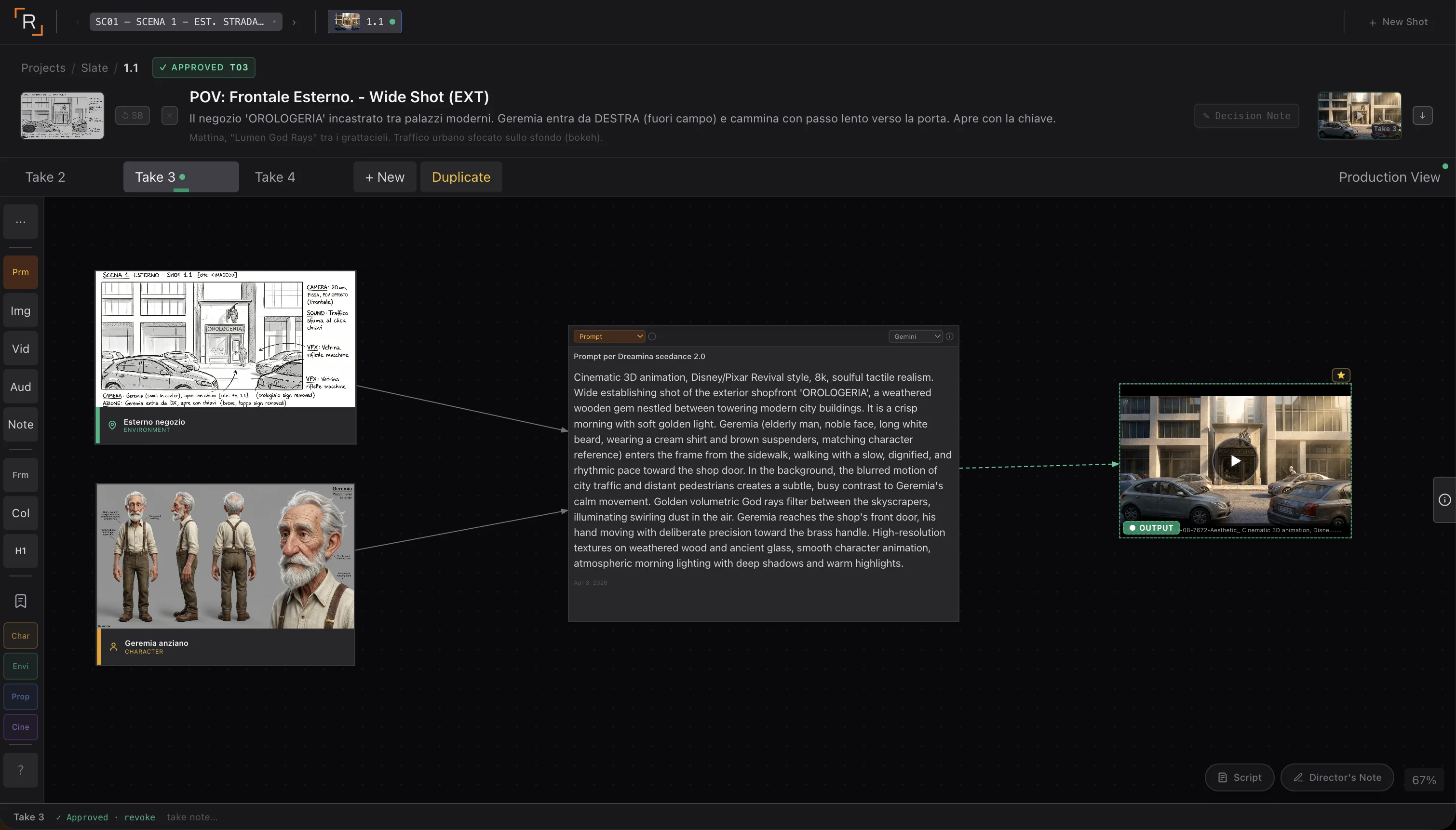
Rewake is a cinematic memory system for narrative AI projects. It is not a generator — you continue using Runway, Kling, Veo, Midjourney, ComfyUI. It is not a moodboard or a project management tool. It is a workspace structured around the hierarchy of the film — Project → Scene → Shot → Take — where every prompt, reference, output and decision stays connected to the others.
In practice: you build the structure in Rewake before generating. Then you work in your tool of choice. When you have an output, you bring it into the correct take. The prompt stays attached to that take. The reference stays linked to the shot. The decision note stays recorded with the take selected as Final Visual.
A real example: Tempus Fugit
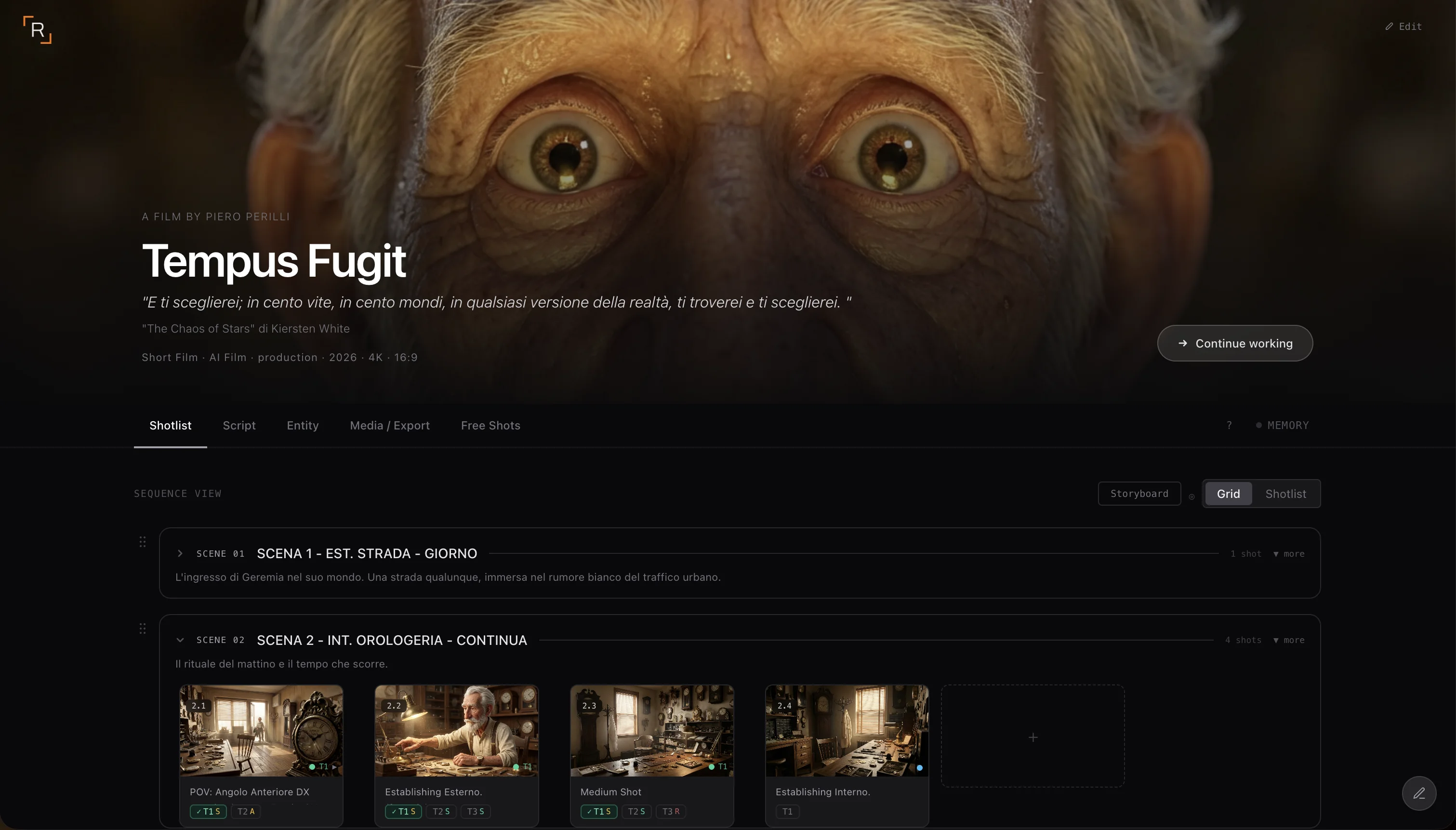
I am working on Tempus Fugit, an AI short film set in a clockmaker's workshop. Scene 2 — INT. CLOCKMAKER'S SHOP — has four shots. Shot 2.1 is a POV from the front-right corner of the workshop: the protagonist at the worktable, morning light filtering through gears.
For this shot I generated four takes with Seedance 2.0. Take 3 was right — the light was correct and the character's movement had the right weight. I marked it as Final Visual with a note: "Morning light filtered through gears and dust. Suspended atmosphere. Slow, measured movement."
That prompt, that character sheet reference, that note — they are inside take 3, inside shot 2.1, inside Scene 2. In a month, when I need to generate variants, the context is there. Nothing to reconstruct.
Who it is useful for — and who it is not
Rewake is useful if you are working on a narrative project with multiple scenes and shots — a short film, a structured commercial, an AI series, a music video with visual continuity to maintain. It is useful if your workflow involves multiple generation sessions over time, possibly with different tools.
It is not the right tool if you only need an archive, a moodboard, or a task management tool. If you generate single images without narrative context, the structure Rewake provides is probably more than you need.
The question that distinguishes who needs it from who does not: when you return to an AI project after two weeks, do you still understand what you had decided and why? If the answer is "not always" — Rewake is built for that problem.
The problem is not the files
Generation tools improve every month. The continuity problem does not — because it is not a technical generation problem, it is a structural problem of how you manage the creative memory of a project. Generation speed multiplies chaos if you do not have a system that contains it. The Scene → Shot → Take structure is not a convention borrowed from traditional cinema: it is the practical answer to how you keep something readable over time when it is built across multiple sessions, with different tools, over long timelines.
If the project stays readable over time, you work better. If it loses context, you start over every time.
Rewake is in private beta. If you are working on an AI project and recognize the problem, you can request access on the site. Every application is reviewed personally.


Have a project in mind?
If this article gave you useful ideas and you want to understand how to apply them to your project, tell me what you need.